Feature: client pipeline
Every lead in view. None of them left to memory.
Every prospect is a card on a board. Drag one to its next stage and CoachTide offers the follow-up that stage calls for, like the booking link or the welcome email, and asks before it sends a thing.
What the board holds for you
Nobody falls through the gap. The board remembers who is next.
Leads arrive from your website, your booking pages and your own conversations. The board keeps every one of them where you can see it.
- Follow-upSam asked you to check back in September. It is on the board.
- New leadAvery wrote through your website. She is in your first stage.
- BookedDana took a discovery call from the link you sent.
- Gone quietTwo weeks without contact. The board flags it.
- WelcomeMarcus said yes. Agreement and intake went out together.
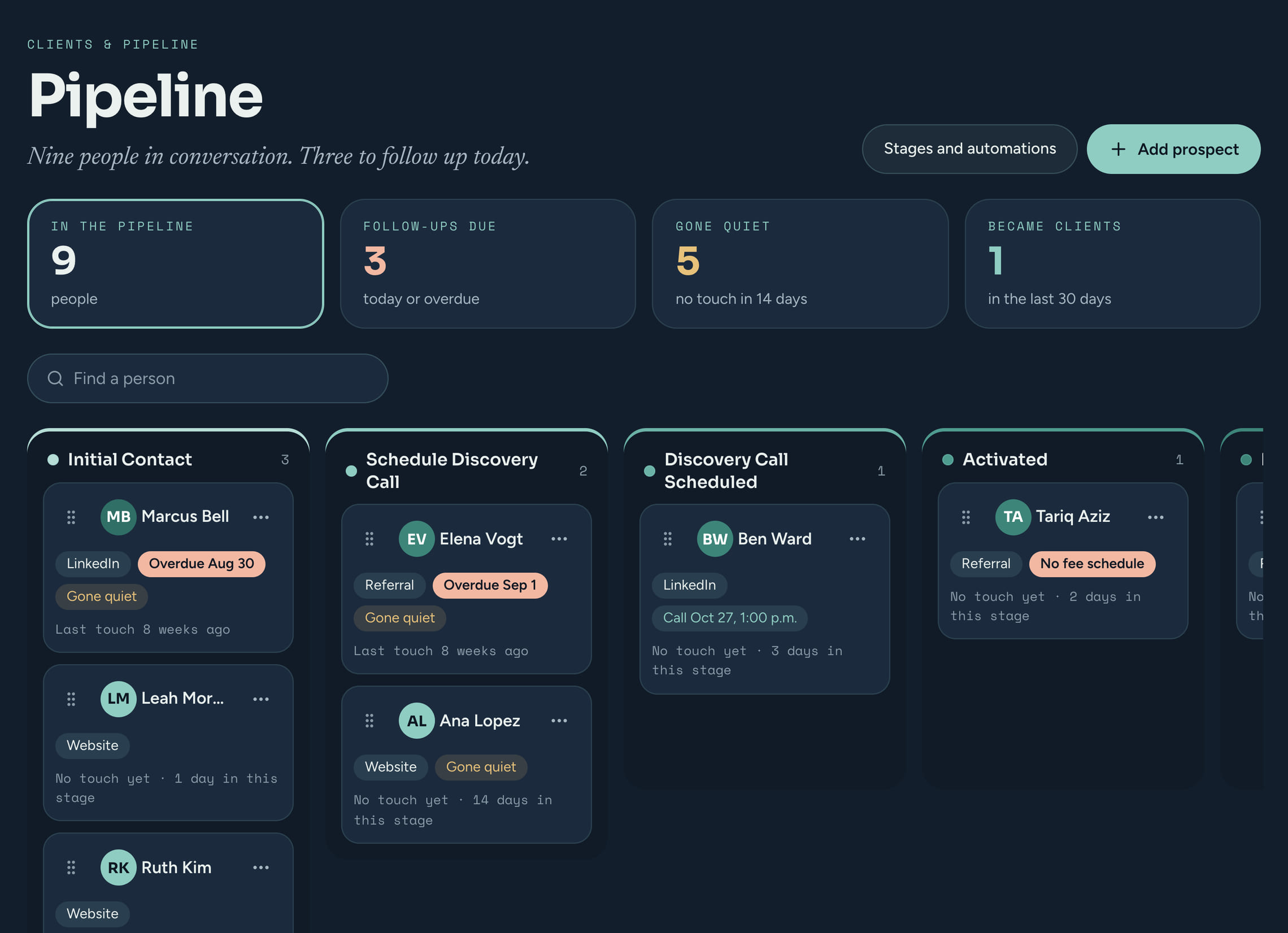
One board
Your whole funnel, at a glance.
The top of the board keeps score: how many prospects are in play, whose follow-up is due today or overdue, and who has gone quiet for two weeks or more.
- Each card shows how long since you last spoke, where they came from, and a follow-up date that turns to Soon and then Overdue.
- Drag a card and its stage and last-contact date update in the same move.
On-drop follow-ups
Drop a card. Confirm the next step.
Each stage can carry one follow-up. It is off until you switch it on, and every drop asks you first, naming exactly what will happen. Nothing goes out on its own.
Activating a client with no fee set? The same prompt lets you set the rate before the welcome goes, so nobody is onboarded at the wrong price.
- Send the booking linkEmails your intro-call booking link when a lead is ready to talk.
- Activate and welcomeMakes them an active client and sends the coaching agreement and intake form in one welcome email.
- Keep in touch every 3 or 6 monthsSets them as a prospect with a gentle reach-out email on that rhythm, until they say yes or you stop it.
- Reach out on your own timeSets them as a prospect with no automatic emails at all.
- Stand them downMarks them inactive and takes them off the board, when it was not a fit.
Your stages
Your stages. Your rules.
Rename, reorder, add or remove any stage, so the board matches how you take on clients. Remove a stage and its prospects move to the first one that is left, so nobody loses their place.
- Drag to reorder, click to rename, add or remove whenever you like
- One optional follow-up per stage, off until you switch it on
- Starter stages in one click if you would rather not begin from nothing
- ⋮⋮Initial contactNo follow-up
- ⋮⋮Schedule a callSend the booking link
- ⋮⋮ActivatedActivate client, send agreement and intake
- ⋮⋮Follow-upReach out every 6 months
Client metrics
Know your practice, not just your week.
Mark a stage for capture and dropping a prospect into it opens a quick form for the things you track: how they found you, what they chose, and why they did not book. The Client Metrics report turns those answers into a picture.
- Which channels actually send you clients
- Why prospects walked away, by the reasons you log
- Fields you name, rename, retire or mark sensitive. The report only reflects what you already keep.
How they found you
If they did not book, why
- Price · 41%
- Timing · 28%
- Chose someone else · 17%
Where leads come from
Every way in lands on the same board.
Your website
A message through the contact form on your CoachTide website puts a new sender in your first stage, and you get an email with a button to open their record.
Your booking pages
Someone who books from your public page can land straight in the stage you choose, with how they heard about you if you ask.
Added by hand
Met someone at a talk? Add them as a prospect in a few seconds, with where they came from.
Private by design
How this protects your clients
Nothing starts emailing a prospect until you say yes on the drop, and a gentle reach-out stops the moment they become a client or you stop it. Your prospects live in your practice alone, walled off from every other coach by the database itself, and stored at rest in Canada.
Questions
About the pipeline
Will it email someone the moment I move a card?
No. A stage only offers a follow-up if you have switched one on, and even then a prompt names what will happen and waits for you to confirm.
Can I use my own stages?
Yes. Rename, reorder, add or remove any of them. If you remove a stage, its prospects move to the first stage that is left.
What happens to someone who was not ready yet?
Drop them into a stage that keeps in touch every 3 or 6 months, and a gentle reach-out goes on that rhythm until they become a client or you stop it. Or keep them as a prospect with no emails and reach out yourself.
Do I have to track client metrics?
No. Capture is off for a stage until you turn it on, and you choose every field.
Stop letting leads go cold. Let the board remember.
Free during the private beta. Beta coaches keep 40% off for life.