Switching to CoachTide
Bring your practice with you. Your clients stay private on the way in.
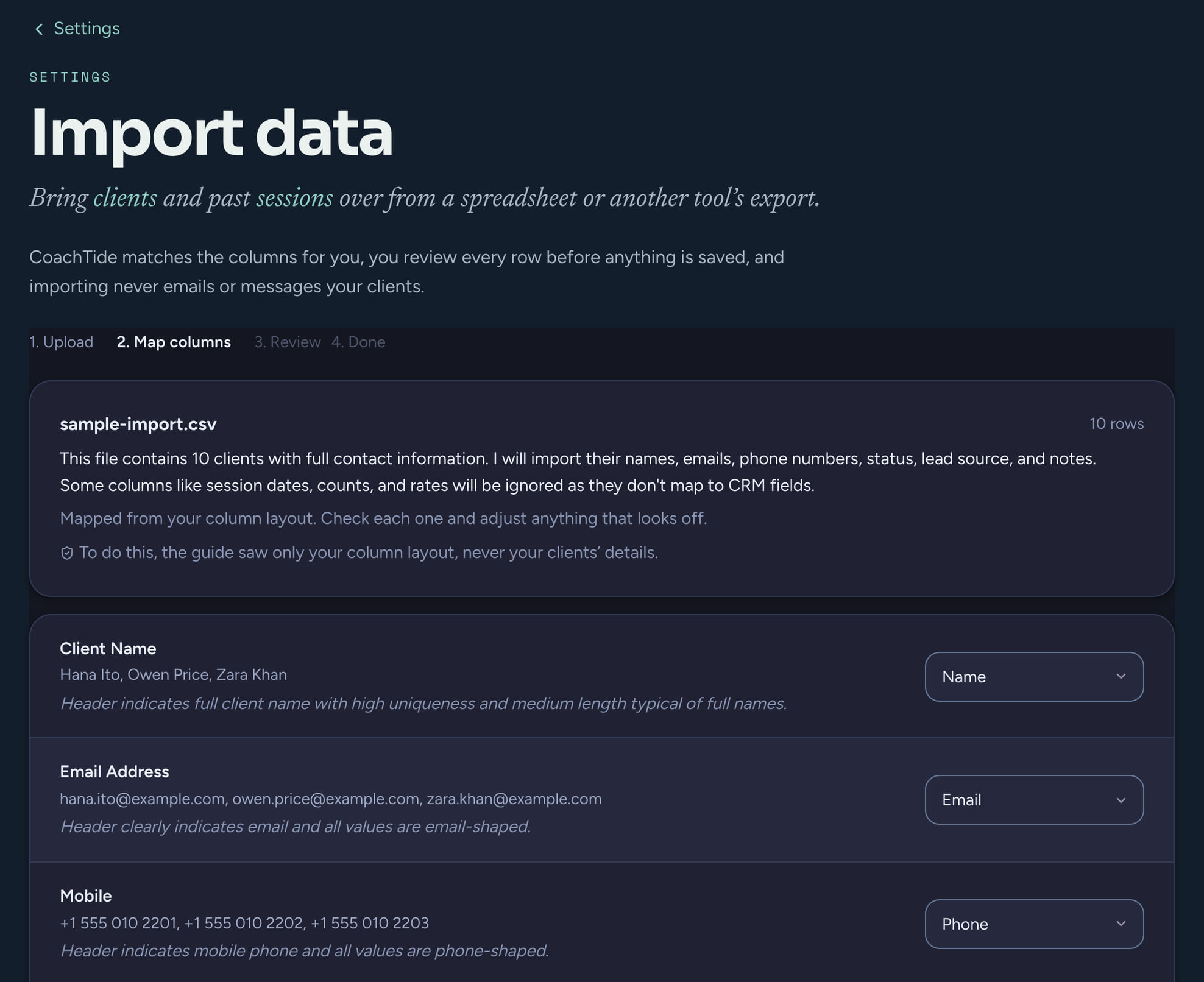
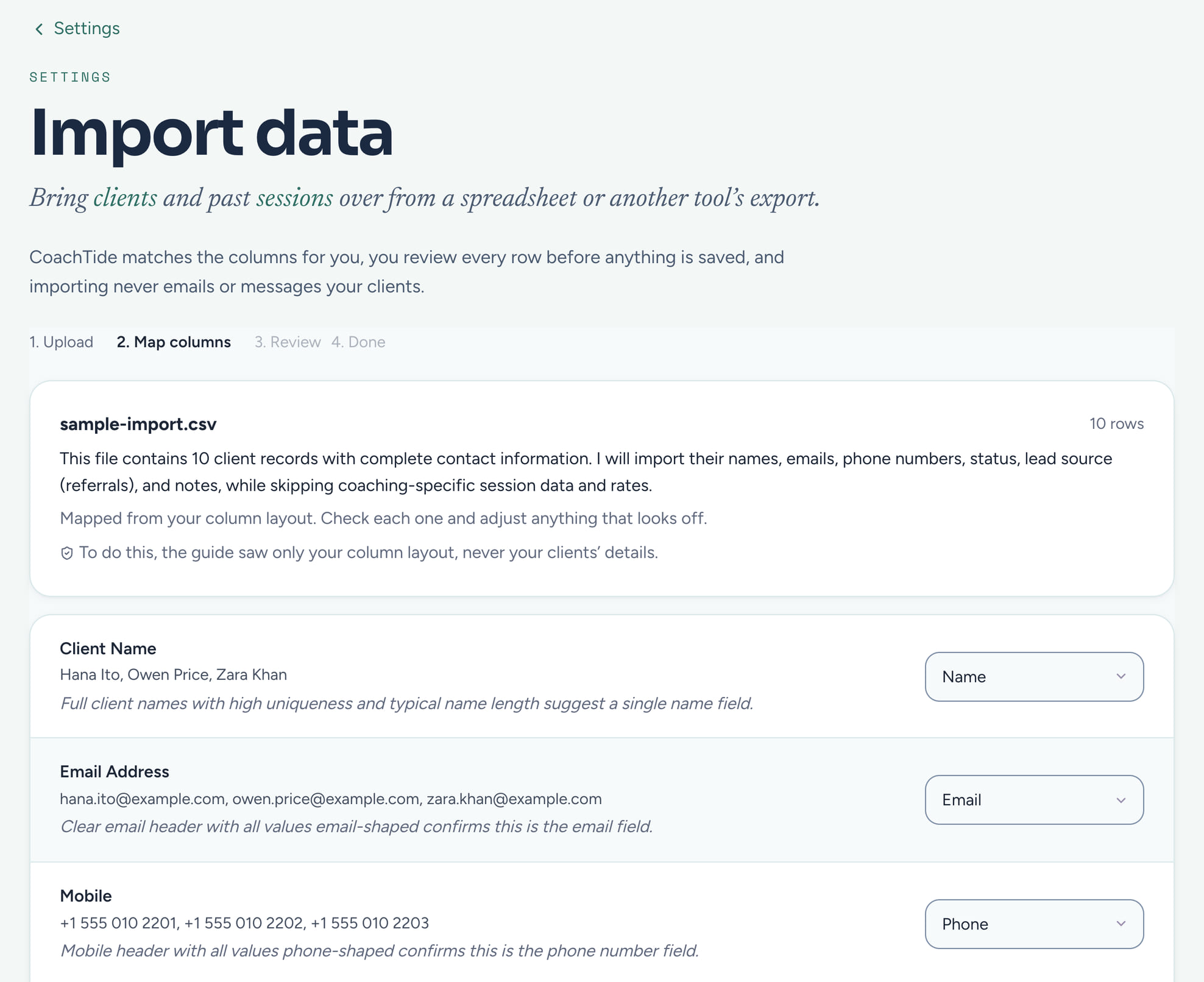
Moving tools is stressful enough without handing a stranger a spreadsheet full of private client details. Our importer works the other way: it reads your column headings and the shape of the file, never the clients inside it, and you check everything before it is saved.
Free during the private beta. Beta coaches keep 40% off for life.
full_name→Client nameemail_address→Client emailsession_date→Session date
How the move works
Three steps, one afternoon.
- 01
Export from your old tool
Most tools give you a spreadsheet of clients and past sessions. A CSV or an Excel workbook both work, one sheet or several.
- 02
Drop in the file
Your browser opens it on your own computer. CoachTide reads the column headings and suggests where each one belongs.
- 03
Check it, then save
You see exactly what will be added, what looks like a duplicate, and anything that needs a look. Nothing is saved until you say so.
The importer that never reads your clients
We map the columns, not your clients.
Your browser opens the file on your own computer and works out a summary of each column: its heading and its shape, like how full it is and whether it looks like dates or email addresses. Only that summary goes to the AI, which suggests where each column belongs. No name, email, note or any other value from your file is sent to it.
- The AI keeps nothing it is sent and never trains on it
- Its suggestion is only a suggestion: you can change any match, and our server checks every one again
- If the AI is unavailable, a plain heading matcher does the job instead, so the import still works
- Heading
email_address - Filled in96% of rows
- Looks likeEmail addresses
- Suggested match→Client email
Review before save
See it all before anything is saved.
After the matching, a review screen lays out what will be added, what will be skipped because it looks like someone you already have, and any row that needs a look. Back out at any point and nothing changes.
- Duplicate clients spotted by email, duplicate sessions by client, date and time
- One file can hold clients, sessions, or both, on as many sheets as you have
- Clients go in first, so their past sessions attach to the right people
What an import will never do
Years of history, and not one surprise email.
Bringing in your records should be silent. Past sessions arrive completed and already billed, so your session history comes with you and nobody hears a thing.
- No welcome emails to the clients you bring in
- No reminders or texts about old sessions
- No invoices for sessions you already billed
- No events added to your calendar
If your platform closed
Wherever you are moving from, there is a home here.
Practice, Profi and Nudge all wound down in 2025 and left coaches looking for somewhere stable to land. Tell us where you are coming from and we will help you bring your practice across.
Leaving Practice
Bring your client list and session history across, then pick up where you left off with booking, invoicing and notes in one place.
Leaving Profi
Move your clients and records into CoachTide, with booking, invoices and prep ready on your first day.
Leaving Nudge
Import your export and keep coaching, with your clients kept private through the whole move.
Private by design
How this protects your clients
The values in your file never go to the AI: it sees only column headings and the shape of each column, and keeps nothing. Once you save, your records are stored at rest in Canada, walled off from every other practice by the database itself, and yours to export again whenever you like.
Questions
About switching
What can I import?
Clients and past sessions, from a CSV file or an Excel workbook, up to 2,000 rows on each sheet. Invoices and payments are not imported.
Does the AI read my clients' details?
No. Your browser opens the file and builds a summary of each column, its heading and its shape. Only that summary goes to the AI, which keeps nothing and never trains on it. The values themselves go to CoachTide only when you choose to save.
Will my clients get emails when I import them?
No. An import never sends a welcome, a reminder, a text or an invoice, and never adds anything to your calendar.
What if I change my mind later?
Export everything, or one client, whenever you like. Your records are yours to take with you.
Land somewhere that holds.
Free during the private beta. Beta coaches keep 40% off for life.