Feature: session prep
Walk in ready. Every session, no scramble.
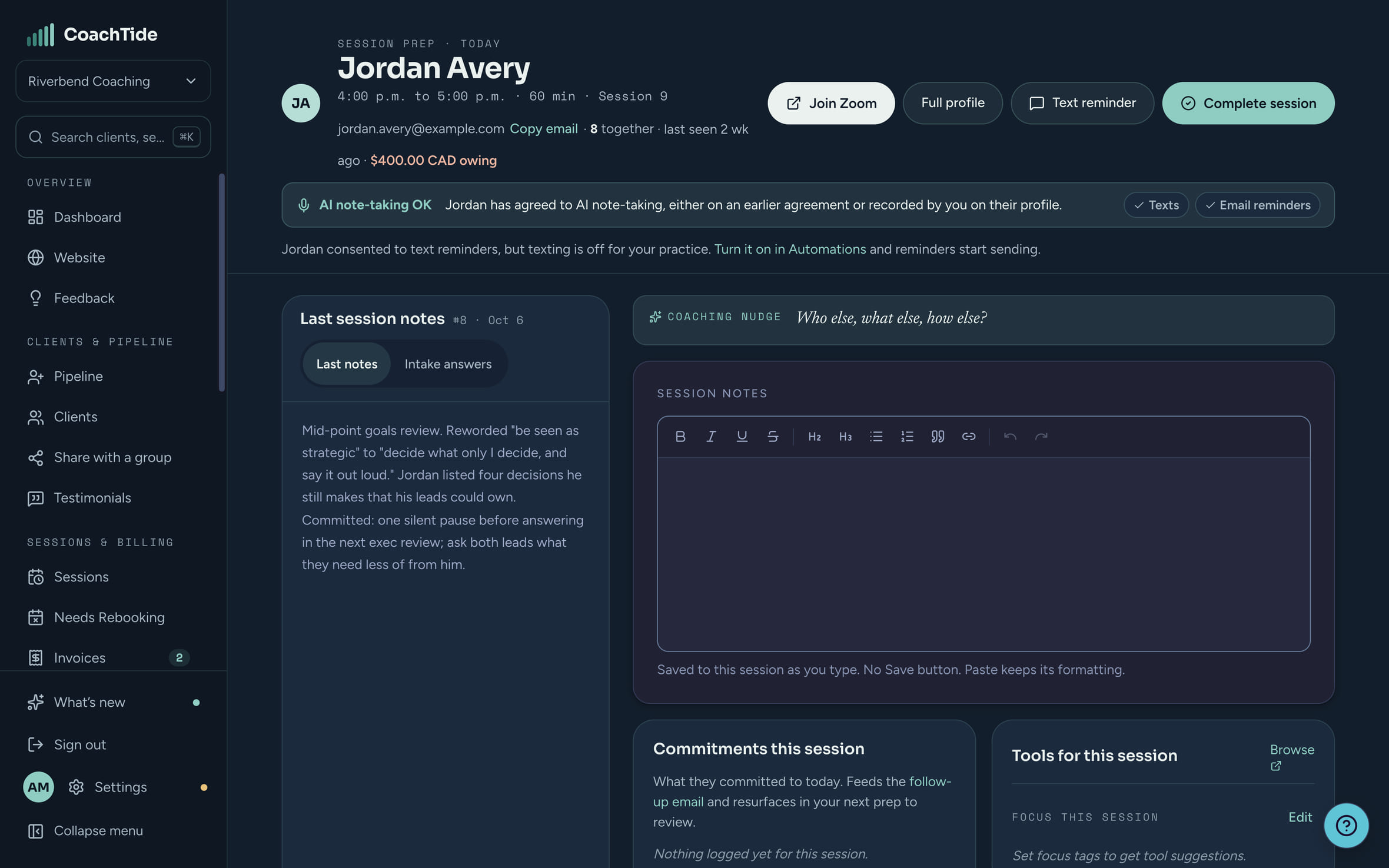
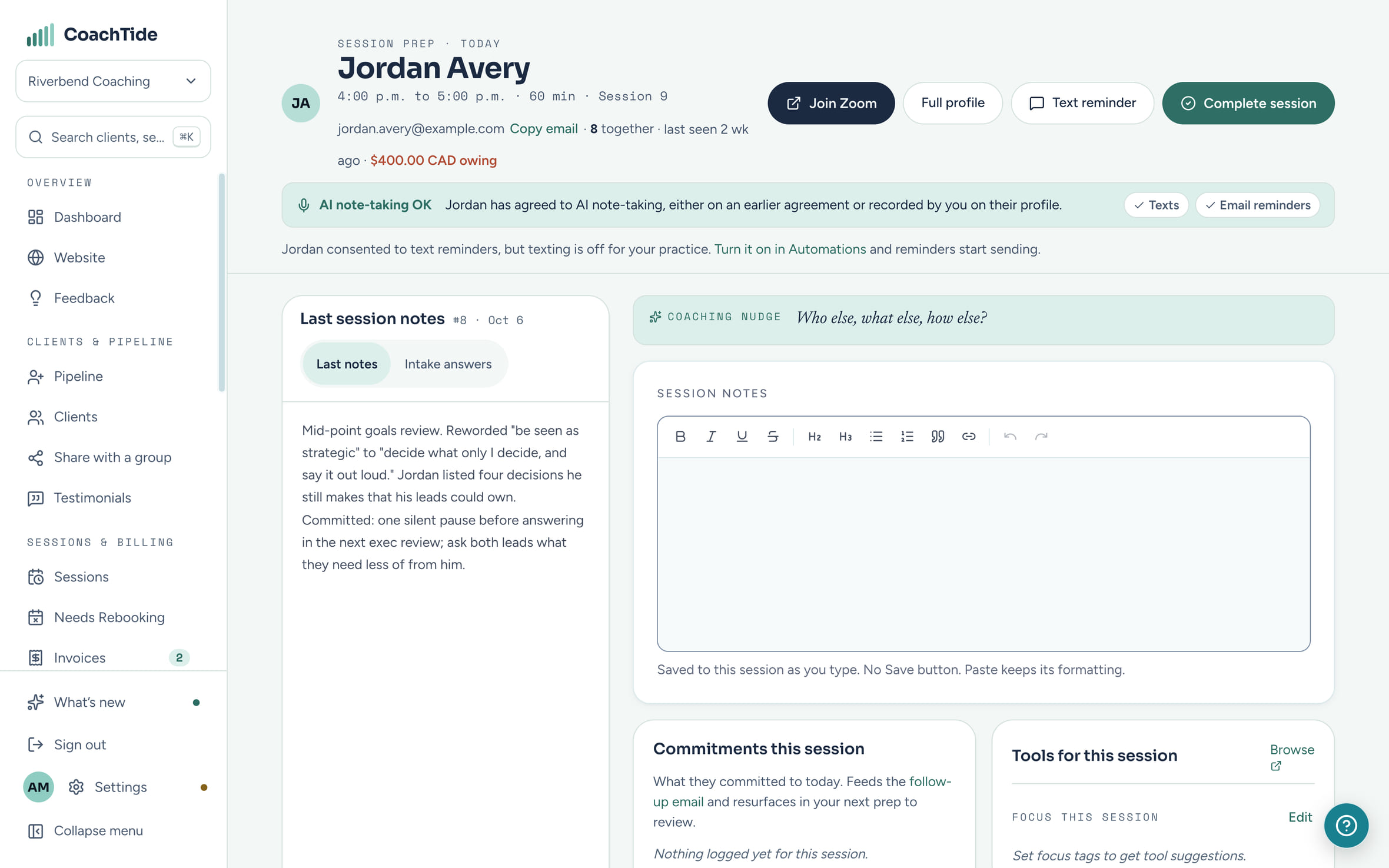
Open a session and the whole picture is already there: where you are together, what they committed to, what is still owed, and a place for notes that saves as you type. No tab shuffle, no trying to remember where you left off.
One screen
Everything for the call, on one page.
On a computer the prep screen fills the window and nothing scrolls away. Each box holds its own part of the picture.
Gathered before you open it
Nothing to dig for. It is waiting on the screen.
Prep pulls together what you would otherwise hunt for across your notes, your inbox and your invoices.
- CommitmentsTwo open from last week, ready to review together.
- IntakeHer answers, on screen before your first call.
- ConsentAgreed to recording in her signed agreement.
- Balance$240 outstanding. A quiet heads-up before you dial in.
- ToolkitDelegation and hard conversations, matched to today.
In the room
Built for during the call, not just before it.
Prep stays open while you coach. Glance at their goals, tick off what they followed through on, and add a commitment the moment it is made.
- A Join button for the session's Zoom or Google Meet link
- Active goals beside the conversation, and last session's notes to read back
- Before a first session, their intake answers, with a way to turn any answer into a goal
- A button to send them a reminder with the join link
Notes save as you type and when you click away. It only says Saved when they really are.
Commitments
Commitments that carry themselves forward.
Log what a client commits to as the session unfolds. It goes into the follow-up email after the call and comes back at the top of the next prep, so the review at the start of a session is done for you.
- Log commitments live, in a click
- They flow into the follow-up email
- Open ones return next time, tagged with the session they came from
- Send the board update he drafted last week
- Block two mornings for deep work
From this session
- Bring one task he has been avoiding handing off to next week
Prompts and tools
A quiet prompt, and the right tool, when it helps.
A band of your own coaching prompts fades from one to the next while you work, slowly enough not to pull your eye. Tag what today is about and the tools from your toolkit that fit rise to the top.
- Your prompts, in your words, on the pace you set
- Tools suggested from today's focus, or pinned for this client until you use them
- Mark which tools you used, for an honest record
Tools for this session
After the call
Close the loop before the next one starts.
A one-minute wrap-up
Notes, commitments, new goals and a line to open next time with, captured in one pass while the call is fresh.
Know what goes out
Before you mark a session complete, you see which follow-up email will send, with how many commitments, and what happens with billing.
A nudge if you forgot
Finished a call without writing it up? A wrap-up prompt waits on the client record until you do.
Private by design
How this protects your clients
The top of every prep screen shows what this client agreed to: whether recording is OK under their signed agreement, and whether they said yes to texts and email reminders. You know before you press Join, so nobody is recorded who did not agree.
Questions
About prep
Do I need to set anything up for prep to work?
No. Prep builds itself from what is already in CoachTide: the session, the client, their goals, commitments, notes and invoices.
Can I lose notes if my connection drops?
Notes save as you type. If a save fails, the screen says Not saved rather than pretending, so you know to copy what you wrote.
Where do the coaching prompts come from?
You start with a set we wrote, and you can edit, hide or replace every one with your own.
Does prep record or transcribe the call?
No. Prep shows whether the client agreed to recording, so you can decide what to use. It does not record anything itself.
Never scramble at the top of a call again.
Free during the private beta. Beta coaches keep 40% off for life.